-
For Investors
Deal flow built on criteria, not connections.
PitchABC surfaces pre-screened, investor-ready startups that match your thesis — so you spend your time on deals that fit, not filtering out the ones that don’t.
30-day free trial · Use code TRIAL30 · Verified accredited investors only
THE SIGNAL PROBLEM
Most deal flow is noise. PitchABC is the filter.
Angels and funds at the early stage see hundreds of cold inbounds a month — decks from founders who haven’t validated their market, teams missing key hires, financials built on wishful thinking. You spend hours screening to find the two or three that are actually worth a conversation.
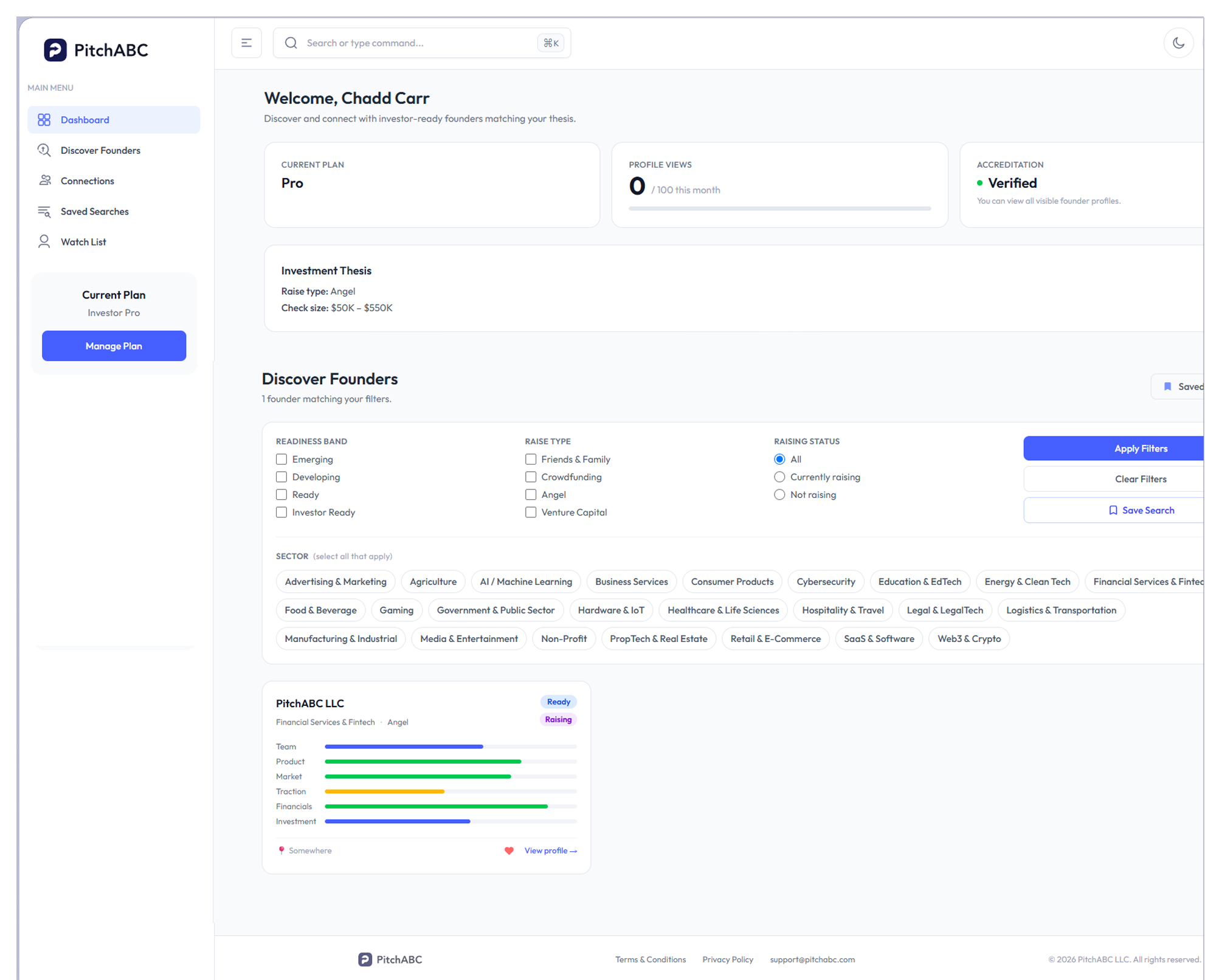
PitchABC removes that overhead. Every startup on the platform has been scored against 40+ investor-grade criteria before you ever see their profile. You filter by thesis. You get signal, not volume.
HOW IT WORKS
Configure once. Get matched continuously.
Set Your Thesis
ell the platform what you’re looking for. Configure your investment thesis — raise type, sector, stage, geography, and check size. PitchABC uses your criteria to filter the founder marketplace and surface only the startups that match. Your thesis is the algorithm. You control it.
Discover & Evaluate
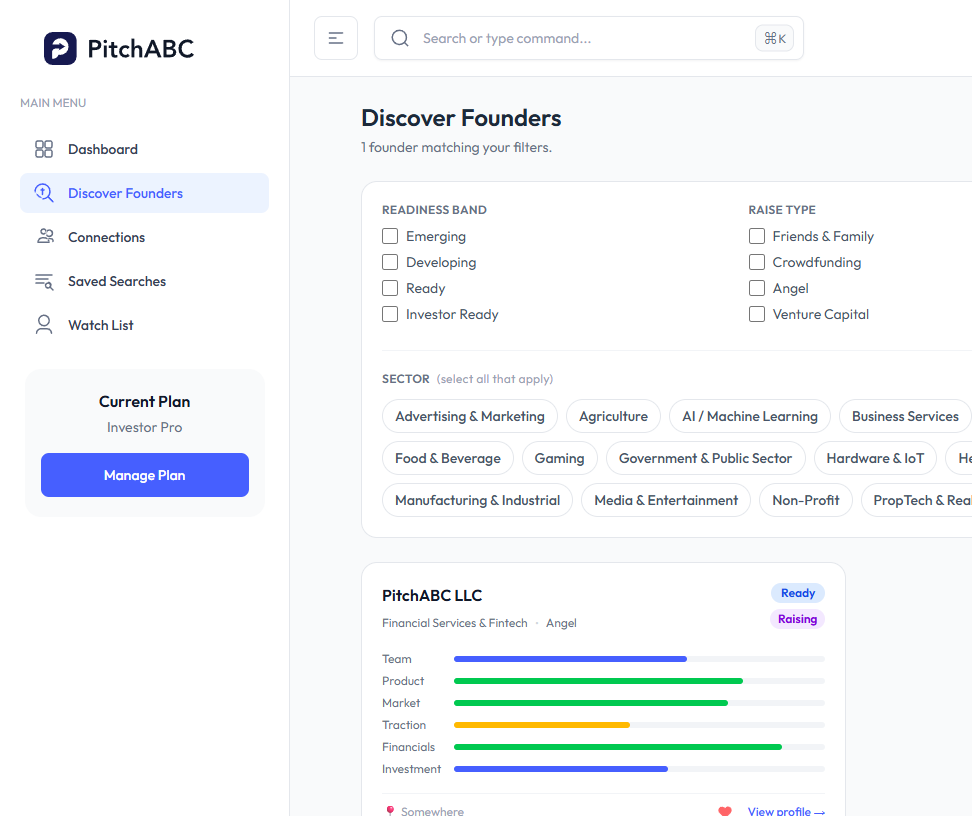
Browse structured profiles. Filter by readiness. Every founder on PitchABC has completed a 215-question profile scored across six investor-critical dimensions. Filter by readiness band, sector, and stage. Save searches. Build your Watch List. Evaluate deals on criteria — not cold decks.
Connect & Engage
You initiate. Founders respond. When you find a match, send a connection request. Once accepted, you unlock the full Tier 2 profile — team details, traction data, financials, investment ask, and any documents the founder has made visible. All communication happens in-platform.
STRUCTURED PROFILES
Evaluate every startup on the same criteria.
Every founder on PitchABC has gone through the same structured 215-question assessment — scored by a proprietary rubric built from real investor input. You’re not reading polished marketing decks. You’re reading standardized signal across the dimensions that actually drive investment decisions.
Six Dimensions
Every founder profile is scored across:
| Team | Founder credibility, domain expertise, gaps |
| Product | Stage, clarity, differentiation |
| Market | Size, realism, competitive positioning |
| Traction | Customer validation, revenue signals, retention |
| Financials | Model quality, projections, burn discipline |
| Investment Fit | Raise alignment, use of funds, and the instrument |
Dimension weights shift by funding stage — pre-seed weights Team and Product most heavily; seed shifts toward Traction. The rubric adjusts automatically so you’re always comparing apples to apples at each stage.
Readiness Bands
Know the quality tier before you open a profile.
Body: Every startup displays their readiness band — not a raw score:
- Emerging (0–34): Significant gaps — not yet visible on the platform
- Developing (35–54): Early-stage — some foundations in place
- Ready (55–74): Well-positioned — fundability thresholds met
- Investor Ready (75–100): Strong profile — priority placement
You can filter your discovery view by band, so you only see the quality tier that fits your diligence appetite.
Two-Tier Profiles
Structured overview first. Full detail on connection.
- Tier 1 (visible to all matching investors): readiness band, sector, stage, raise type, founding year, team size, and a structured summary.
- Tier 2 (unlocked after founder approves your connection request): full team backgrounds, traction metrics, financial model details, investment ask, and any documents the founder has shared.
The two-tier system protects founder confidentiality while giving you enough signal to decide whether a connection is worth requesting.
Gap Analysis Access
See where the risk lives before you ask. Connected investors can view a founder’s gap analysis — the specific criteria flagged as below-threshold in their score. This means you know where the weaknesses are before your first conversation. No surprises in diligence. No wasted partner time on deal-breakers you could have spotted at the screening stage.
- In-platform messaging
- Deal alerts
- Watch List band
THESIS-DRIVEN SEARCH
Stop browsing. Start matching.
PitchABC’s search and filter tools are built around your investment mandate — not generic keyword search. Every filter maps to a structured data field on the founder’s profile, so results are precise and consistent. Build a saved search and the platform runs it continuously — when a new founder goes visible and matches your criteria, you’re notified automatically.
- Filter by sector, stage, raise type, geography, and readiness band
- Save up to 20 searches with automatic alerts
- Watch List for founders you want to track over time
- Band-change alerts when a watched founder improves their readiness tier
- Notes and tagging on every profile to manage your pipeline
- Full search history and view log
VERIFIED INVESTORS
Stand out to founders who have options.
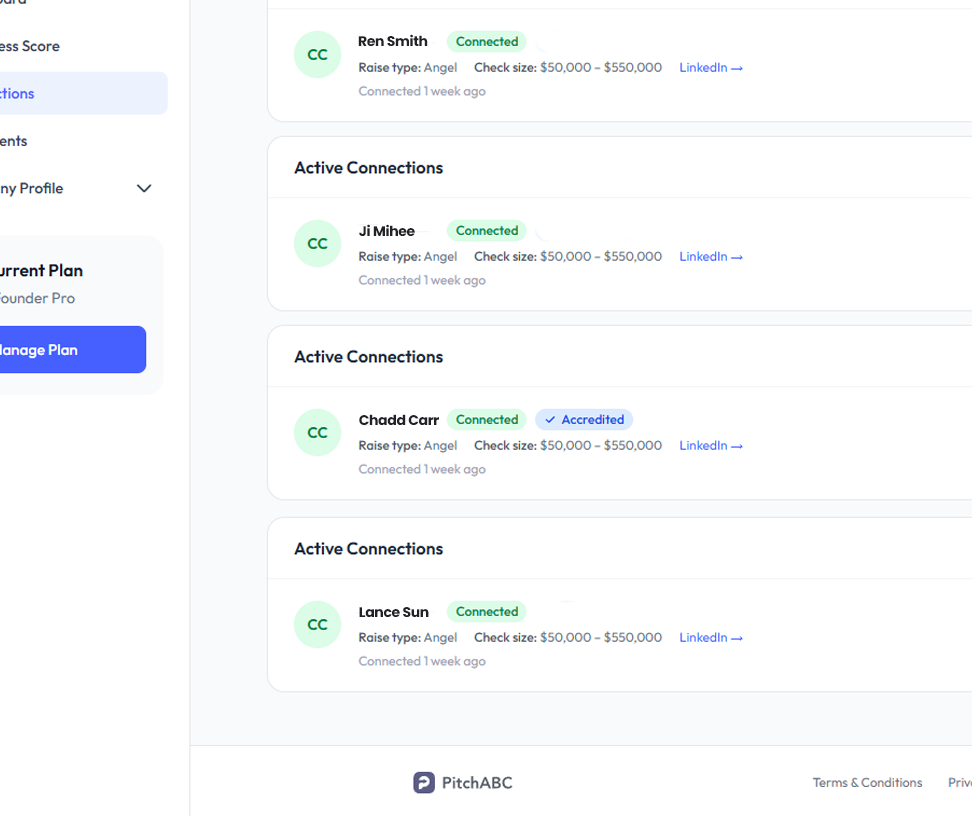
Founders on PitchABC control who they connect with. When multiple investors request a connection, they evaluate who’s reaching out — and a Verified Investor badge signals that you’re a serious, accredited, vetted participant on the platform.
Verification is a one-time accreditation document review. Once verified, your badge appears on all connection requests and your investor profile — increasing acceptance rates and positioning you ahead of unverified investors in a competitive early-stage deal.
Verified badge is available on the Pro+ plan.
- One-time accreditation document upload
- Verified badge on all connection requests
- Increased founder acceptance rates
- Required before viewing profiles of founders in "currently raising" status
- Signals commitment and legitimacy to founders evaluating your request
Better deal flow starts with better criteria.
Try PitchABC free for 30 days. No auto-charge. Cancel anytime.
Use code TRIAL30 at checkout.
Who can use PitchABC as an investor?
PitchABC is built for accredited investors — angels, scouts, family offices, and early-stage funds. All investors must complete accreditation verification before accessing profiles of founders who are actively raising. If you’re not yet accredited, you can still sign up and explore the platform during your trial period while verification is in progress.
How is this different from AngelList, Crunchbase, or LinkedIn?
Those platforms surface self-reported data from founders at any stage of readiness. PitchABC only surfaces founders who have completed a structured 215-question assessment and scored above visibility thresholds. You’re not searching a database — you’re accessing a pre-screened pipeline of founders who have been evaluated against real investor-grade criteria. Every profile is standardized, so you can compare across deals consistently.
How does the matching and alert system work?
You configure a thesis — stage, sector, raise type, geography — and save it as a search. PitchABC monitors the founder marketplace continuously. When a new founder goes visible and matches your saved search criteria, you receive an alert. Watch List alerts fire separately when a founder you’re tracking improves their readiness band — a signal they’re actively closing gaps and moving toward raise-readiness.
What does a connection request unlock?
Sending a connection request is free and doesn’t count toward your profile view cap. When a founder accepts, you unlock their full Tier 2 profile — complete team backgrounds, traction metrics, financial details, investment ask, and any documents they’ve chosen to share. You can then communicate directly through the in-platform messaging system.
What is the Verified Investor badge and do I need it?
The Verified Investor badge (Pro+ only) appears on your profile and all connection requests you send. It signals to founders that you’ve completed accreditation verification and are a serious, vetted investor on the platform. It’s not required to use PitchABC, but it increases founder acceptance rates and positions you ahead of unverified investors when founders are weighing connection requests.
Can I cancel or switch plans anytime?
Yes. Cancel or change plans anytime from your account settings. If you cancel, you retain access through the end of your current billing period. Upgrading from Pro to Pro+ takes effect immediately.